Código (Conversiones.java):
package conversiones;
import java.util.Arrays;
public class Conversiones {
public static void main(String[] args) {
System.out.println("Dec\tBin\tBoolean");
String cod;
boolean[] mCod;
for (int i = 0; i < 16; i++) {
cod = Integer.toBinaryString(i);
while (cod.length() < 4) {
cod = "0" + cod;
}
mCod = new boolean[cod.length()];
for (int j = 0; j < cod.length(); j++) {
mCod[j] = cod.charAt(j) == '1';
}
System.out.println(i + "\t" + cod + "\t" + Arrays.toString(mCod));
}
}
}
Resultado:
run:
Dec Bin Boolean
0 0000 [false, false, false, false]
1 0001 [false, false, false, true]
2 0010 [false, false, true, false]
3 0011 [false, false, true, true]
4 0100 [false, true, false, false]
5 0101 [false, true, false, true]
6 0110 [false, true, true, false]
7 0111 [false, true, true, true]
8 1000 [true, false, false, false]
9 1001 [true, false, false, true]
10 1010 [true, false, true, false]
11 1011 [true, false, true, true]
12 1100 [true, true, false, false]
13 1101 [true, true, false, true]
14 1110 [true, true, true, false]
15 1111 [true, true, true, true]
BUILD SUCCESSFUL (total time: 0 seconds)
sábado, 20 de agosto de 2022
Conversión decimal > binario > boleano

Generación de laberintos II. Cambio de formato.
Ejemplo de tranformación:

Código 1 (Blogspot_Laberinto.java):
package blogspot_laberinto;
public class Blogspot_Laberinto {
public static void main(String[] args) {
// Tamaño laberinto
int x = 15;
int y = 27;
String strMaze = new Maze(y - 2, x - 2).toString();
boolean[][] map0 = new StructMaze(strMaze, x, y).mMaze;
StyleMaze sm = new StyleMaze(map0, x, y);
// mostrar resultados
System.out.println("\nLaberinto formato 1:\n");
System.out.println(strMaze);
System.out.println("\nLaberinto formato 2:\n");
System.out.println(sm.map1);
}
private static class StructMaze {
char[] vMaze;
boolean[][] mMaze;
public StructMaze(String strMaze, int x, int y) {
vMaze = strMaze.replace("\n", "").toCharArray();
mMaze = new boolean[x + 2][y + 2]; //se suma 2 para los bordes (ahorrar codigo)
int cont = 0;
for (int i = 1; i < x + 1; i++) {
for (int j = 1; j < y + 1; j++) {
mMaze[i][j] = vMaze[cont] == '█';
cont++;
}
}
}
}
}
Código 2 (Maze.java):
package blogspot_laberinto;
import java.util.LinkedList;
import java.util.Random;
public class Maze {
public static final char PASSAGE_CHAR = ' ';
public static final char WALL_CHAR = '█';
public static final boolean WALL = false;
public static final boolean PASSAGE = !WALL;
private final boolean map[][];
private final int width;
private final int height;
public Maze(final int width, final int height) {
this.width = width;
this.height = height;
this.map = new boolean[width][height];
final LinkedList<int[]> frontiers = new LinkedList<>();
final Random random = new Random();
int x = random.nextInt(width);
int y = random.nextInt(height);
frontiers.add(new int[]{x, y, x, y});
while (!frontiers.isEmpty()) {
final int[] f = frontiers.remove(random.nextInt(frontiers.size()));
x = f[2];
y = f[3];
if (map[x][y] == WALL) {
map[f[0]][f[1]] = map[x][y] = PASSAGE;
if (x >= 2 && map[x - 2][y] == WALL) {
frontiers.add(new int[]{x - 1, y, x - 2, y});
}
if (y >= 2 && map[x][y - 2] == WALL) {
frontiers.add(new int[]{x, y - 1, x, y - 2});
}
if (x < width - 2 && map[x + 2][y] == WALL) {
frontiers.add(new int[]{x + 1, y, x + 2, y});
}
if (y < height - 2 && map[x][y + 2] == WALL) {
frontiers.add(new int[]{x, y + 1, x, y + 2});
}
}
}
}
@Override
public String toString() {
final StringBuffer b = new StringBuffer();
for (int x = 0; x < width + 2; x++) {
b.append(WALL_CHAR);
}
b.append('\n');
for (int y = 0; y < height; y++) {
b.append(WALL_CHAR);
for (int x = 0; x < width; x++) {
b.append(map[x][y] == WALL ? WALL_CHAR : PASSAGE_CHAR);
}
b.append(WALL_CHAR);
b.append('\n');
}
for (int x = 0; x < width + 2; x++) {
b.append(WALL_CHAR);
}
b.append('\n');
return b.toString();
}
}
Código 3 (StyleMaze.java):
package blogspot_laberinto;
public class StyleMaze {
public String map1;
public StyleMaze(boolean[][] p0, int x, int y) {
this.map1 = "";
String strMuro = " ├┬┌┤─┐┬┴└│├┘┴┤┼";
boolean[][] mCod = combina();
for (int i = 1; i < x + 1; i++) {
for (int j = 1; j < y + 1; j++) {
if (p0[i][j]) { // si hay muro
for (int k = 0; k < 16; k++) {
if (p0[i - 1][j] == mCod[k][0] && p0[i][j - 1] == mCod[k][1] && p0[i + 1][j] == mCod[k][2] && p0[i][j + 1] == mCod[k][3]) {
map1 += strMuro.charAt(k);
}
}
} else {
map1 += " ";
}
}
map1 += "\n";
}
}
private boolean[][] combina() {
String cod;
boolean[][] mCod = new boolean[16][4];
for (int i = 0; i < 16; i++) {
cod = Integer.toBinaryString(i);
while (cod.length() < 4) {
cod = "0" + cod;
}
for (int j = 0; j < cod.length(); j++) {
mCod[i][j] = cod.charAt(j) == '1';
}
}
return mCod;
}
}
Resultado:
run:
Laberinto formato 1:
███████████████████████████
█ █ █ █ █ █ █
█ █████ ███ █ █ █ █ █████ █
█ █ █ █ █ █
███████ ███ █ ███ █ █ █████
█ █ █ █ █ █ █ █ █ █
███ ███ ███ ███ █ █████ █ █
█ █ █ █ █ █ █ █ █
█████████ █ █ ███ █ █ █ ███
█ █ █ █ █
███████ ███ ███ █ █████ █ █
█ █ █ █ █
███ █████ █ █ █ █████ █ ███
█ █ █ █ █ █ █
███████████████████████████
Laberinto formato 2:
┌─┬───────┬─┬─┬─────────┬─┐
│ │ │ │ │ │ │
│ └───┤ ┌─┘ │ ┴ ┬ ┬ ├───┘ │
│ │ │ │ │ │
├─────┤ ├─┤ │ ┌─┤ │ ┬ ┌─┬─┤
│ │ │ │ │ │ │ │ │ │
├─┤ ┌─┤ └─┐ ├─┤ ┴ ├─┼─┤ ┴ │
│ │ │ │ │ │ │ │ │
├───┴───┤ ┴ ┴ └─┐ ┴ ┴ │ ┌─┤
│ │ │ │ │
├───┬─┤ ┌─┤ ┌─┤ ┴ ├───┘ ┴ │
│ │ │ │ │
├─┤ └───┘ ┬ │ ┬ ├───┐ ┬ ├─┤
│ │ │ │ │ │ │
└─────────┴─┴─┴─────┴─┴───┘
BUILD SUCCESSFUL (total time: 0 seconds)
jueves, 11 de agosto de 2022
Generación de laberintos I.1. Algoritmo de Prim's 2.
Código 1 (Prime2.java):
package prime2;
public class Prime2 {
public static void main(String[] args) {
String laberinto = new Maze(31, 13).toString();
System.out.println(laberinto);
}
}
Código 2 (Maze.java):
package prime2;
import java.util.LinkedList;
import java.util.Random;
public class Maze {
public static final char PASSAGE_CHAR = ' ';
public static final char WALL_CHAR = '▓';
public static final boolean WALL = false;
public static final boolean PASSAGE = !WALL;
private final boolean map[][];
private final int width;
private final int height;
public Maze(final int width, final int height) {
this.width = width;
this.height = height;
this.map = new boolean[width][height];
final LinkedList<int[]> frontiers = new LinkedList<>();
final Random random = new Random();
int x = random.nextInt(width);
int y = random.nextInt(height);
frontiers.add(new int[]{x, y, x, y});
while (!frontiers.isEmpty()) {
final int[] f = frontiers.remove(random.nextInt(frontiers.size()));
x = f[2];
y = f[3];
if (map[x][y] == WALL) {
map[f[0]][f[1]] = map[x][y] = PASSAGE;
if (x >= 2 && map[x - 2][y] == WALL) {
frontiers.add(new int[]{x - 1, y, x - 2, y});
}
if (y >= 2 && map[x][y - 2] == WALL) {
frontiers.add(new int[]{x, y - 1, x, y - 2});
}
if (x < width - 2 && map[x + 2][y] == WALL) {
frontiers.add(new int[]{x + 1, y, x + 2, y});
}
if (y < height - 2 && map[x][y + 2] == WALL) {
frontiers.add(new int[]{x, y + 1, x, y + 2});
}
}
}
}
@Override
public String toString() {
final StringBuffer b = new StringBuffer();
for (int x = 0; x < width + 2; x++) {
b.append(WALL_CHAR);
}
b.append('\n');
for (int y = 0; y < height; y++) {
b.append(WALL_CHAR);
for (int x = 0; x < width; x++) {
b.append(map[x][y] == WALL ? WALL_CHAR : PASSAGE_CHAR);
}
b.append(WALL_CHAR);
b.append('\n');
}
for (int x = 0; x < width + 2; x++) {
b.append(WALL_CHAR);
}
b.append('\n');
return b.toString();
}
}
Resultado:

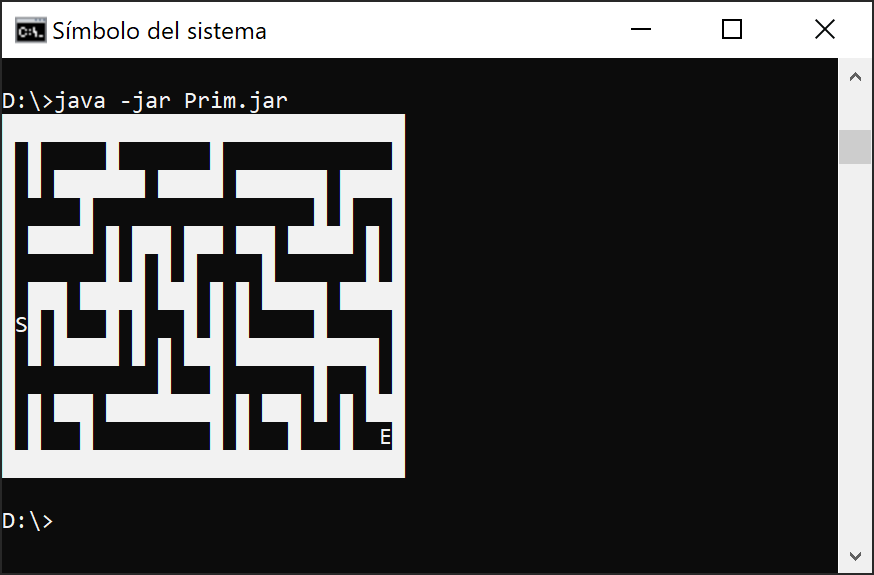
Generación de laberintos I. Algoritmo de Prim's 1.
Autor algoritmo: J. Zong en "Maze Generation with Prim's Algorithm"
Código (Prim.java):
package prim;
import java.util.ArrayList;
public class Prim {
public static void main(String[] args) { // dimensions of generated maze
int r = 13, c = 31;
// build maze and initialize with only walls
StringBuilder s = new StringBuilder(c);
for (int x = 0; x < c; x++) {
s.append('█');
}
char[][] maz = new char[r][c];
for (int x = 0; x < r; x++) {
maz[x] = s.toString().toCharArray();
}
// select random point and open as start node
Point st = new Point((int) (Math.random() * r), (int) (Math.random() * c), null);
maz[st.r][st.c] = 'S';
// iterate through direct neighbors of node
ArrayList< Point> frontier = new ArrayList< Point>();
for (int x = -1; x <= 1; x++) {
for (int y = -1; y <= 1; y++) {
if (x == 0 && y == 0 || x != 0 && y != 0) {
continue;
}
try {
if (maz[st.r + x][st.c + y] == ' ') {
continue;
}
} catch (Exception e) { // ignore ArrayIndexOutOfBounds
continue;
}
// add eligible points to frontier
frontier.add(new Point(st.r + x, st.c + y, st));
}
}
Point last = null;
while (!frontier.isEmpty()) {
// pick current node at random
Point cu = frontier.remove((int) (Math.random() * frontier.size()));
Point op = cu.opposite();
try {
// if both node and its opposite are walls
if (maz[cu.r][cu.c] == '█' && maz[op.r][op.c] == '█') {
// open path between the nodes
maz[cu.r][cu.c] = ' ';
maz[op.r][op.c] = ' ';
// store last node in order to mark it later
last = op;
// iterate through direct neighbors of node, same as earlier
for (int x = -1; x <= 1; x++) {
for (int y = -1; y <= 1; y++) {
if (x == 0 && y == 0 || x != 0 && y != 0) {
continue;
}
try {
if (maz[op.r + x][op.c + y] == ' ') {
continue;
}
} catch (Exception e) {
continue;
}
frontier.add(new Point(op.r + x, op.c + y, op));
}
}
}
} catch (Exception e) { // ignore NullPointer and ArrayIndexOutOfBounds
}
// if algorithm has resolved, mark end node
if (frontier.isEmpty()) {
maz[last.r][last.c] = 'E';
}
}
// print final maze
for (int i = 0; i < r; i++) {
for (int j = 0; j < c; j++) {
System.out.print(maz[i][j]);
}
System.out.println();
}
}
static class Point {
Integer r;
Integer c;
Point parent;
public Point(int x, int y, Point p) {
r = x;
c = y;
parent = p;
}
// compute opposite node given that it is in the other direction from the parent
public Point opposite() {
if (this.r.compareTo(parent.r) != 0) {
return new Point(this.r + this.r.compareTo(parent.r), this.c, this);
}
if (this.c.compareTo(parent.c) != 0) {
return new Point(this.r, this.c + this.c.compareTo(parent.c), this);
}
return null;
}
}
}
Resultado:
miércoles, 10 de agosto de 2022
Distancia entre 2 puntos en un espacio n-dimensional.
Fórmula:
d(P,Q) = SQRT[ (Q1-P1)^2 + (Q2-P2)^2 + (Q3-P3)^2 + ... + (Qn-Pn)^2 ]
Código java (Distancia2p.java)
package distancia2p;
import java.util.Arrays;
public class Distancia2p {
public static void main(String[] args) {
int n = 6; //numero de dimensiones
int[] A = new int[n];
int[] B = new int[n];
//posición cartesiana n coordenadas
int maximo = 100;
int minimo = 1;
for (int i = 0; i < n; i++) {
//numero aleatoria entre 1 (minimo) y 100 (maximo)
A[i] = (int) Math.floor(Math.random() * (maximo - minimo + 1)) + minimo;
B[i] = (int) Math.floor(Math.random() * (maximo - minimo + 1)) + minimo;
}
double aux = 0;
double distancia;
for (int i = 0; i < n; i++) {
aux = aux + Math.pow((A[i] - B[i]), 2);
}
distancia = Math.sqrt(aux);
//mostrar resultados
System.out.println("*Distancia entre 2 puntos en un espacio de " + n + "-dimensiones:");
System.out.println("coordenadas punto A: " + Arrays.toString(A));
System.out.println("coordenadas punto B: " + Arrays.toString(B));
System.out.println("Distancia entre punto A y B: " + distancia);
}
}
Resultado:
run:
*Distancia entre 2 puntos en un espacio de 6-dimensiones:
coordenadas punto A: [29, 89, 69, 33, 18, 22]
coordenadas punto B: [76, 93, 41, 53, 43, 91]
Distancia entre punto A y B: 93.78166132032425
BUILD SUCCESSFUL (total time: 0 seconds)
miércoles, 3 de agosto de 2022
Gráficos 2D. Creación de un fractal 2 (árbol).
Código 1: (Blogspot_Fractal.java):
package blogspot_fractal;
import java.awt.Graphics2D;
import java.awt.image.BufferedImage;
import java.io.File;
import java.io.IOException;
import javax.imageio.ImageIO;
public class Blogspot_Fractal {
public static void main(String[] args) {
int x = 300;
int y = 256;
int angulo = -90;
int depth = 9;
BufferedImage imagen = new BufferedImage(x, y, BufferedImage.TYPE_INT_RGB);
Dibujo.Dibujar((Graphics2D) imagen.getGraphics(), x / 2, y, angulo, depth);
try {
ImageIO.write(imagen, "png", new File("Arbol.png"));
} catch (IOException e) {
System.out.println("Error de escritura");
}
}
}
Código 2: (Dibujo.java):
package blogspot_fractal;
import java.awt.BasicStroke;
import java.awt.Color;
import java.awt.Graphics2D;
import java.awt.RenderingHints;
class Dibujo {
public static void Dibujar(Graphics2D g, int x1, int y1, double angle, int depth) {
if (depth == 0) {
return;
}
g.setColor(Color.GREEN);
// grosor rama dependiendo de la profundidad
g.setStroke(new BasicStroke((float) depth));
//Filtro antialiasing
g.setRenderingHint(
RenderingHints.KEY_ANTIALIASING,
RenderingHints.VALUE_ANTIALIAS_ON);
int x2 = x1 + (int) (Math.cos(Math.toRadians(angle)) * depth * 5.0);
int y2 = y1 + (int) (Math.sin(Math.toRadians(angle)) * depth * 6.0);
g.drawLine(x1, y1, x2, y2);
Dibujar(g, x2, y2, angle - 30, depth - 1);
Dibujar(g, x2, y2, angle + 30, depth - 1);
}
}
Resultado:

martes, 2 de agosto de 2022
Graficos 2D. Curva de Hilbert 2 (4K)
Código 1: (Blogspot_Curvahilbert.java)
package blogspot_curvahilbert;
import java.awt.Graphics2D;
import java.awt.image.BufferedImage;
import java.io.File;
import java.io.IOException;
import javax.imageio.ImageIO;
public class Blogspot_CurvaHilbert {
public static void main(String[] args) {
// resolucion 4K
int x = 2160;
int y = 2160;
int depth = 8;
BufferedImage imagen = new BufferedImage(x, y, BufferedImage.TYPE_INT_RGB);
Dibujo.Dibujar((Graphics2D) imagen.getGraphics(), x / 2, y / 2, depth, y / 2);
try {
ImageIO.write(imagen, "png", new File("CurbaHilbert.png"));
} catch (IOException e) {
System.out.println("Error de escritura");
}
}
}
Código 2: (Dibujo.java):
package blogspot_curvahilbert;
import java.awt.Color;
import java.awt.Graphics2D;
class Dibujo {
public static void Dibujar(Graphics2D g, int x, int y, int n, int size) {
if (n == 0) {
return;
}
int x0 = x - size / 2;
int x1 = x + size / 2;
int y0 = y - size / 2;
int y1 = y + size / 2;
g.setColor(Color.GREEN);
g.drawLine(x0, y0, x0, y1);
g.drawLine(x1, y0, x1, y1);
g.drawLine(x0, y, x1, y);
Dibujar(g, x0, y0, n - 1, size / 2);
Dibujar(g, x0, y1, n - 1, size / 2);
Dibujar(g, x1, y0, n - 1, size / 2);
Dibujar(g, x1, y1, n - 1, size / 2);
}
}
Resultado:

domingo, 31 de julio de 2022
Graficando red neuronal en 4K (perceptrón).
Código 1 (Graficando_Perceptron):
package blogger_graficando;
import java.awt.image.BufferedImage;
import java.io.File;
import java.io.IOException;
import javax.imageio.ImageIO;
public class Graficando_Perceptron extends javax.swing.JFrame {
public int x = 3840;
public int y = 2160;
public Graficando_Perceptron() {
initComponents();
this.setLocationRelativeTo(null);
}
@SuppressWarnings("unchecked")
// <editor-fold defaultstate="collapsed" desc="Generated Code">
private void initComponents() {
jPanelEstructura = new javax.swing.JPanel();
jLabelEstructura = new javax.swing.JLabel();
jTextFieldEstructura = new javax.swing.JTextField();
jPanelResolucion = new javax.swing.JPanel();
jLabelAnchura = new javax.swing.JLabel();
jTextFieldAnchura = new javax.swing.JTextField();
jLabelAltura = new javax.swing.JLabel();
jTextFieldAltura = new javax.swing.JTextField();
jPanelBotonera = new javax.swing.JPanel();
jLabel1 = new javax.swing.JLabel();
jLabel2 = new javax.swing.JLabel();
jButtonGraficar = new javax.swing.JButton();
jButtonRestaurar = new javax.swing.JButton();
jSeparator1 = new javax.swing.JSeparator();
setDefaultCloseOperation(javax.swing.WindowConstants.EXIT_ON_CLOSE);
setTitle("Graficando Perceptron");
jLabelEstructura.setText("Estructura:");
jTextFieldEstructura.setText("4,20,20,20,20,8");
javax.swing.GroupLayout jPanelEstructuraLayout = new javax.swing.GroupLayout(jPanelEstructura);
jPanelEstructura.setLayout(jPanelEstructuraLayout);
jPanelEstructuraLayout.setHorizontalGroup(
jPanelEstructuraLayout.createParallelGroup(javax.swing.GroupLayout.Alignment.LEADING)
.addGroup(jPanelEstructuraLayout.createSequentialGroup()
.addGap(14, 14, 14)
.addComponent(jLabelEstructura)
.addPreferredGap(javax.swing.LayoutStyle.ComponentPlacement.RELATED)
.addComponent(jTextFieldEstructura, javax.swing.GroupLayout.DEFAULT_SIZE, 307, Short.MAX_VALUE)
.addContainerGap())
);
jPanelEstructuraLayout.setVerticalGroup(
jPanelEstructuraLayout.createParallelGroup(javax.swing.GroupLayout.Alignment.LEADING)
.addGroup(jPanelEstructuraLayout.createSequentialGroup()
.addContainerGap()
.addGroup(jPanelEstructuraLayout.createParallelGroup(javax.swing.GroupLayout.Alignment.LEADING)
.addGroup(jPanelEstructuraLayout.createSequentialGroup()
.addGap(5, 5, 5)
.addComponent(jLabelEstructura))
.addComponent(jTextFieldEstructura, javax.swing.GroupLayout.PREFERRED_SIZE, 27, javax.swing.GroupLayout.PREFERRED_SIZE))
.addContainerGap(javax.swing.GroupLayout.DEFAULT_SIZE, Short.MAX_VALUE))
);
jPanelResolucion.setLayout(new java.awt.GridLayout());
jLabelAnchura.setHorizontalAlignment(javax.swing.SwingConstants.CENTER);
jLabelAnchura.setText("Anchura:");
jPanelResolucion.add(jLabelAnchura);
jTextFieldAnchura.setHorizontalAlignment(javax.swing.JTextField.CENTER);
jTextFieldAnchura.setText("3840");
jPanelResolucion.add(jTextFieldAnchura);
jLabelAltura.setHorizontalAlignment(javax.swing.SwingConstants.CENTER);
jLabelAltura.setText("Altura:");
jPanelResolucion.add(jLabelAltura);
jTextFieldAltura.setHorizontalAlignment(javax.swing.JTextField.CENTER);
jTextFieldAltura.setText("2160");
jPanelResolucion.add(jTextFieldAltura);
jPanelBotonera.setLayout(new java.awt.GridLayout());
jPanelBotonera.add(jLabel1);
jPanelBotonera.add(jLabel2);
jButtonGraficar.setText("Graficar");
jButtonGraficar.setFocusable(false);
jButtonGraficar.setHorizontalTextPosition(javax.swing.SwingConstants.CENTER);
jButtonGraficar.setVerticalTextPosition(javax.swing.SwingConstants.BOTTOM);
jButtonGraficar.addActionListener(new java.awt.event.ActionListener() {
public void actionPerformed(java.awt.event.ActionEvent evt) {
jButtonGraficarActionPerformed(evt);
}
});
jPanelBotonera.add(jButtonGraficar);
jButtonRestaurar.setText("Restaurar");
jButtonRestaurar.setFocusable(false);
jButtonRestaurar.setHorizontalTextPosition(javax.swing.SwingConstants.CENTER);
jButtonRestaurar.setVerticalTextPosition(javax.swing.SwingConstants.BOTTOM);
jButtonRestaurar.addActionListener(new java.awt.event.ActionListener() {
public void actionPerformed(java.awt.event.ActionEvent evt) {
jButtonRestaurarActionPerformed(evt);
}
});
jPanelBotonera.add(jButtonRestaurar);
javax.swing.GroupLayout layout = new javax.swing.GroupLayout(getContentPane());
getContentPane().setLayout(layout);
layout.setHorizontalGroup(
layout.createParallelGroup(javax.swing.GroupLayout.Alignment.LEADING)
.addGroup(layout.createSequentialGroup()
.addContainerGap()
.addGroup(layout.createParallelGroup(javax.swing.GroupLayout.Alignment.LEADING)
.addGroup(layout.createSequentialGroup()
.addGroup(layout.createParallelGroup(javax.swing.GroupLayout.Alignment.TRAILING, false)
.addComponent(jPanelBotonera, javax.swing.GroupLayout.DEFAULT_SIZE, 396, Short.MAX_VALUE)
.addGroup(layout.createParallelGroup(javax.swing.GroupLayout.Alignment.LEADING, false)
.addComponent(jPanelResolucion, javax.swing.GroupLayout.DEFAULT_SIZE, javax.swing.GroupLayout.DEFAULT_SIZE, Short.MAX_VALUE)
.addComponent(jPanelEstructura, javax.swing.GroupLayout.DEFAULT_SIZE, javax.swing.GroupLayout.DEFAULT_SIZE, Short.MAX_VALUE)))
.addGap(0, 0, Short.MAX_VALUE))
.addComponent(jSeparator1, javax.swing.GroupLayout.Alignment.TRAILING))
.addContainerGap())
);
layout.linkSize(javax.swing.SwingConstants.HORIZONTAL, new java.awt.Component[] {jPanelBotonera, jPanelEstructura, jPanelResolucion});
layout.setVerticalGroup(
layout.createParallelGroup(javax.swing.GroupLayout.Alignment.LEADING)
.addGroup(layout.createSequentialGroup()
.addContainerGap()
.addComponent(jPanelEstructura, javax.swing.GroupLayout.PREFERRED_SIZE, javax.swing.GroupLayout.DEFAULT_SIZE, javax.swing.GroupLayout.PREFERRED_SIZE)
.addPreferredGap(javax.swing.LayoutStyle.ComponentPlacement.RELATED)
.addComponent(jPanelResolucion, javax.swing.GroupLayout.PREFERRED_SIZE, javax.swing.GroupLayout.DEFAULT_SIZE, javax.swing.GroupLayout.PREFERRED_SIZE)
.addPreferredGap(javax.swing.LayoutStyle.ComponentPlacement.RELATED, javax.swing.GroupLayout.DEFAULT_SIZE, Short.MAX_VALUE)
.addComponent(jSeparator1, javax.swing.GroupLayout.PREFERRED_SIZE, 10, javax.swing.GroupLayout.PREFERRED_SIZE)
.addPreferredGap(javax.swing.LayoutStyle.ComponentPlacement.RELATED)
.addComponent(jPanelBotonera, javax.swing.GroupLayout.PREFERRED_SIZE, javax.swing.GroupLayout.DEFAULT_SIZE, javax.swing.GroupLayout.PREFERRED_SIZE)
.addContainerGap())
);
layout.linkSize(javax.swing.SwingConstants.VERTICAL, new java.awt.Component[] {jPanelBotonera, jPanelEstructura, jPanelResolucion});
pack();
}// </editor-fold>
private void jButtonGraficarActionPerformed(java.awt.event.ActionEvent evt) {
String estructura = jTextFieldEstructura.getText();
x = Integer.parseInt(jTextFieldAnchura.getText());
y = Integer.parseInt(jTextFieldAltura.getText());
BufferedImage imagen = new BufferedImage(x, y, BufferedImage.TYPE_INT_RGB);
Dibujar t = new Dibujar(imagen.getGraphics(), x, y, jTextFieldEstructura.getText());
try {
ImageIO.write(imagen, "png", new File("p" + x + "x" + y+"(" + estructura + ").png"));
} catch (IOException e) {
System.out.println("Error de escritura");
}
}
private void jButtonRestaurarActionPerformed(java.awt.event.ActionEvent evt) {
jTextFieldEstructura.setText("4,20,20,20,20,8");
jTextFieldAnchura.setText("3840");
jTextFieldAltura.setText("2160");
}
public static void main(String args[]) {
java.awt.EventQueue.invokeLater(new Runnable() {
public void run() {
new Graficando_Perceptron().setVisible(true);
}
});
}
// Variables declaration - do not modify
private javax.swing.JButton jButtonGraficar;
private javax.swing.JButton jButtonRestaurar;
private javax.swing.JLabel jLabel1;
private javax.swing.JLabel jLabel2;
private javax.swing.JLabel jLabelAltura;
private javax.swing.JLabel jLabelAnchura;
private javax.swing.JLabel jLabelEstructura;
private javax.swing.JPanel jPanelBotonera;
private javax.swing.JPanel jPanelEstructura;
private javax.swing.JPanel jPanelResolucion;
private javax.swing.JSeparator jSeparator1;
private javax.swing.JTextField jTextFieldAltura;
private javax.swing.JTextField jTextFieldAnchura;
private javax.swing.JTextField jTextFieldEstructura;
// End of variables declaration
}
Código 2 (Dibujar.java):
package blogger_graficando;
import java.awt.BasicStroke;
import java.awt.Color;
import java.awt.Graphics;
import java.awt.Graphics2D;
import java.awt.RenderingHints;
import java.awt.Stroke;
import java.util.ArrayList;
import java.util.List;
import java.util.Random;
class Dibujar {
Graphics g;
Graphics2D g2;
Random random = new Random();
Boolean c50;
public Dibujar(Graphics g, int width, int height, String estruct) {
g2 = (Graphics2D) g;
g2.setRenderingHint(RenderingHints.KEY_ANTIALIASING, RenderingHints.VALUE_ANTIALIAS_ON);
// Grosor pincel
Stroke stroke04 = new BasicStroke(0.4f);
// fondo blanco
g2.setColor(Color.WHITE);
g2.draw3DRect(0, 0, width, height, true);
g2.fillRect(0, 0, width, height);
// añadir datos estructura perceptrón
List<Integer> estructura = new ArrayList<>();
for (String aux1 : estruct.split(",")) {
estructura.add(Integer.parseInt(aux1));
}
int maxX = estructura.size();
int maxY = maximo(estructura);
int nParticionesX = maxX + 2; // se suma 2 para margen izquierdo e derecho
int nParticionesY = maxY + 2; // se suma 2 para margen superior e inferior
int uX = width / nParticionesX;
int uY = height / nParticionesY;
float uSeparadorX = (nParticionesX - estructura.size()) / 2f;
float uSeparadorY;
int posIniX = (int) Math.round(uX * uSeparadorX);
int posIniY;
int[][][] recopilador = new int[maxX][maxY][2]; // k, x, y
// capa 0: pre-logical posiciones
for (int x = 0; x < estructura.size(); x++) {
for (int y = 0; y < estructura.get(x); y++) {
uSeparadorY = (nParticionesY - estructura.get(x)) / 2f;
posIniY = (int) Math.round(uY * uSeparadorY);
recopilador[x][y][0] = (posIniX + (int) uX * x) + (int) (uX / 2);
recopilador[x][y][1] = (posIniY + (int) uY * y) + (int) (uY / 2);
}
}
// capa 1: graficar enlaces
int x1, y1, x2, y2;
g2.setStroke(stroke04);
for (int x = 0; x < estructura.size() - 1; x++) {
for (int y = 0; y < estructura.get(x); y++) {
for (int k = 0; k < estructura.get(x + 1); k++) {
x1 = recopilador[x][y][0];
y1 = recopilador[x][y][1];
x2 = recopilador[x + 1][k][0];
y2 = recopilador[x + 1][k][1];
colorRnd();
g2.drawLine(x1, y1, x2, y2);
}
}
}
// capa 2: graficar neuronas
int radio = (int) Math.round(uY / 4f);
for (int x = 0; x < estructura.size(); x++) {
for (int y = 0; y < estructura.get(x); y++) {
colorRnd();
centrarCirculo(g2, recopilador[x][y][0], recopilador[x][y][1], radio);
}
}
// capa 3: marca de agua
String marca = "https://censorcosmico.blogspot.com/";
String estructura2 = "Estructura de red: [" + estruct + "]";
String resolucion = "Resolución: " + width + "x" + height;
g2.setColor(Color.DARK_GRAY);
g2.drawString(marca, 50, 50);
g2.drawString(estructura2, 50, 70);
g2.drawString(resolucion, 50, 90);
}
private void centrarCirculo(Graphics g2, int x, int y, int r) {
x = x - (r / 2);
y = y - (r / 2);
g2.fillOval(x, y, r, r);
}
/* Busca número mayor del listado de la estructura
* Utilizado para acomodar la gráfica al tamaño de la ventana
*/
private int maximo(List<Integer> estructura) {
int max = 0;
for (int i = 0; i < estructura.size(); i++) {
if (estructura.get(i) >= max) {
max = estructura.get(i);
}
}
return max;
}
private void colorRnd() {
c50 = (random.nextInt(9) == 0);
if (c50) {
g2.setColor(Color.RED);
} else {
g2.setColor(Color.DARK_GRAY);
}
}
}
Resultado:

.png)
lunes, 6 de diciembre de 2021
Cálculo de la cantidad de números primos contenidos en X.
En Netbeans se crea un JFrame y en modo diseño se añaden los siguientes componentes:
jButtonCalcular
jTextFieldNumeroX
jTextFieldResultado
jLabels varios para identificar tipos de datos que hay que añadir en los jTextFields.
jPanels varios para agrupar y facilitar la inserción de los componentes cuando trabajamos en modo diseño.
Código Java (CantidadPrimos.java):
package primosnum;
public class CantidadPrimos extends javax.swing.JFrame {
public CantidadPrimos() {
initComponents();
this.setLocationRelativeTo(null);
}
private void initComponents() { ... *Código generado automaticamente por NetBeans ... }
private void jButtonCalcularActionPerformed(java.awt.event.ActionEvent evt) {
calcular();
}
public static void main(String args[]) {
java.awt.EventQueue.invokeLater(new Runnable() {
public void run() {
new CantidadPrimos().setVisible(true);
}
});
}
// Variables declaration - do not modify
private javax.swing.JButton jButtonCalcular;
private javax.swing.JLabel jLabel1;
private javax.swing.JLabel jLabel2;
private javax.swing.JLabel jLabel3;
private javax.swing.JPanel jPanel1;
private javax.swing.JPanel jPanel2;
private javax.swing.JTextField jTextFieldNumeroX;
private javax.swing.JTextField jTextFieldResultado;
// End of variables declaration
private void calcular() {
double x = Double.parseDouble(jTextFieldNumeroX.getText());
double a0 = (2 * x + Math.pow(-1, x) - 1) / 6; //* usar BigInteger¿?
double a1 = Math.ceil(a0) - 1;
double b = (-1 + (Math.sqrt(-2 + 3 * a0))) / 3;
double k = 0, suma = 0;
double numerador, denominador, resultado;
for (int j = 8; j < a1; j++) {
for (int i = 1; i < b; i++) {
numerador = 4 * j - Math.pow(-1, j) + ((2 * i + 1) * Math.pow(-1, i + j)) + ((2 * i - 1) * Math.pow(-1, i)) - (12 * i * i) + 5;
denominador = 12 * i + 6 - (2 * Math.pow(-1, i));
k += funcionEit(numerador / denominador);
}
suma += funcionEit(k);
k = 0;
}
resultado = Math.ceil((2 * x + Math.pow(-1, x) - 6 * suma + 5) / 6);
jTextFieldResultado.setText("" + (int) resultado);
}
private double funcionEit(double x) {
return ((x <= 0) || (x - Math.floor(x) > 0) ? 0 : 1);
}
}
Resultado:

*Código generado automáticamente por NetBeans
private void initComponents() {
jLabel1 = new javax.swing.JLabel();
jPanel1 = new javax.swing.JPanel();
jLabel3 = new javax.swing.JLabel();
jTextFieldResultado = new javax.swing.JTextField();
jLabel2 = new javax.swing.JLabel();
jTextFieldNumeroX = new javax.swing.JTextField();
jPanel2 = new javax.swing.JPanel();
jButtonCalcular = new javax.swing.JButton();
setDefaultCloseOperation(javax.swing.WindowConstants.EXIT_ON_CLOSE);
setResizable(false);
jLabel1.setFont(new java.awt.Font("Barlow Condensed Medium", 1, 36)); // NOI18N
jLabel1.setForeground(new java.awt.Color(0, 0, 204));
jLabel1.setText("Números Primos en X");
jPanel1.setBorder(javax.swing.BorderFactory.createLineBorder(new java.awt.Color(0, 0, 0)));
jLabel3.setFont(new java.awt.Font("Barlow Condensed Medium", 0, 18)); // NOI18N
jLabel3.setText("Cantidad de primos que contiene X");
jTextFieldResultado.setEditable(false);
jTextFieldResultado.setFont(new java.awt.Font("Barlow Condensed Medium", 0, 36)); // NOI18N
jTextFieldResultado.setHorizontalAlignment(javax.swing.JTextField.CENTER);
jLabel2.setFont(new java.awt.Font("Barlow Condensed Medium", 0, 18)); // NOI18N
jLabel2.setText("Número (x)");
jTextFieldNumeroX.setFont(new java.awt.Font("Barlow Condensed Medium", 0, 36)); // NOI18N
jTextFieldNumeroX.setHorizontalAlignment(javax.swing.JTextField.CENTER);
javax.swing.GroupLayout jPanel1Layout = new javax.swing.GroupLayout(jPanel1);
jPanel1.setLayout(jPanel1Layout);
jPanel1Layout.setHorizontalGroup(
jPanel1Layout.createParallelGroup(javax.swing.GroupLayout.Alignment.LEADING)
.addGroup(jPanel1Layout.createSequentialGroup()
.addContainerGap()
.addGroup(jPanel1Layout.createParallelGroup(javax.swing.GroupLayout.Alignment.LEADING)
.addComponent(jLabel2, javax.swing.GroupLayout.DEFAULT_SIZE, javax.swing.GroupLayout.DEFAULT_SIZE, Short.MAX_VALUE)
.addComponent(jTextFieldNumeroX, javax.swing.GroupLayout.PREFERRED_SIZE, 426, javax.swing.GroupLayout.PREFERRED_SIZE)
.addComponent(jLabel3, javax.swing.GroupLayout.DEFAULT_SIZE, javax.swing.GroupLayout.DEFAULT_SIZE, Short.MAX_VALUE)
.addComponent(jTextFieldResultado, javax.swing.GroupLayout.PREFERRED_SIZE, 426, javax.swing.GroupLayout.PREFERRED_SIZE))
.addContainerGap())
);
jPanel1Layout.linkSize(javax.swing.SwingConstants.HORIZONTAL, new java.awt.Component[] {jTextFieldNumeroX, jTextFieldResultado});
jPanel1Layout.setVerticalGroup(
jPanel1Layout.createParallelGroup(javax.swing.GroupLayout.Alignment.LEADING)
.addGroup(jPanel1Layout.createSequentialGroup()
.addGap(6, 6, 6)
.addComponent(jLabel2)
.addPreferredGap(javax.swing.LayoutStyle.ComponentPlacement.RELATED)
.addComponent(jTextFieldNumeroX, javax.swing.GroupLayout.PREFERRED_SIZE, javax.swing.GroupLayout.DEFAULT_SIZE, javax.swing.GroupLayout.PREFERRED_SIZE)
.addPreferredGap(javax.swing.LayoutStyle.ComponentPlacement.RELATED)
.addComponent(jLabel3)
.addPreferredGap(javax.swing.LayoutStyle.ComponentPlacement.UNRELATED)
.addComponent(jTextFieldResultado, javax.swing.GroupLayout.PREFERRED_SIZE, 38, javax.swing.GroupLayout.PREFERRED_SIZE)
.addContainerGap(javax.swing.GroupLayout.DEFAULT_SIZE, Short.MAX_VALUE))
);
jPanel1Layout.linkSize(javax.swing.SwingConstants.VERTICAL, new java.awt.Component[] {jTextFieldNumeroX, jTextFieldResultado});
jButtonCalcular.setFont(new java.awt.Font("Barlow Condensed Medium", 0, 18)); // NOI18N
jButtonCalcular.setText("Calcular");
jButtonCalcular.addActionListener(new java.awt.event.ActionListener() {
public void actionPerformed(java.awt.event.ActionEvent evt) {
jButtonCalcularActionPerformed(evt);
}
});
javax.swing.GroupLayout jPanel2Layout = new javax.swing.GroupLayout(jPanel2);
jPanel2.setLayout(jPanel2Layout);
jPanel2Layout.setHorizontalGroup(
jPanel2Layout.createParallelGroup(javax.swing.GroupLayout.Alignment.LEADING)
.addGroup(javax.swing.GroupLayout.Alignment.TRAILING, jPanel2Layout.createSequentialGroup()
.addContainerGap(javax.swing.GroupLayout.DEFAULT_SIZE, Short.MAX_VALUE)
.addComponent(jButtonCalcular)
.addContainerGap())
);
jPanel2Layout.setVerticalGroup(
jPanel2Layout.createParallelGroup(javax.swing.GroupLayout.Alignment.LEADING)
.addGroup(jPanel2Layout.createSequentialGroup()
.addContainerGap()
.addComponent(jButtonCalcular)
.addContainerGap())
);
javax.swing.GroupLayout layout = new javax.swing.GroupLayout(getContentPane());
getContentPane().setLayout(layout);
layout.setHorizontalGroup(
layout.createParallelGroup(javax.swing.GroupLayout.Alignment.LEADING)
.addGroup(javax.swing.GroupLayout.Alignment.TRAILING, layout.createSequentialGroup()
.addContainerGap()
.addGroup(layout.createParallelGroup(javax.swing.GroupLayout.Alignment.TRAILING)
.addComponent(jPanel2, javax.swing.GroupLayout.DEFAULT_SIZE, javax.swing.GroupLayout.DEFAULT_SIZE, Short.MAX_VALUE)
.addComponent(jPanel1, javax.swing.GroupLayout.DEFAULT_SIZE, javax.swing.GroupLayout.DEFAULT_SIZE, Short.MAX_VALUE)
.addComponent(jLabel1, javax.swing.GroupLayout.Alignment.LEADING, javax.swing.GroupLayout.DEFAULT_SIZE, javax.swing.GroupLayout.DEFAULT_SIZE, Short.MAX_VALUE))
.addContainerGap())
);
layout.setVerticalGroup(
layout.createParallelGroup(javax.swing.GroupLayout.Alignment.LEADING)
.addGroup(layout.createSequentialGroup()
.addContainerGap()
.addComponent(jLabel1)
.addPreferredGap(javax.swing.LayoutStyle.ComponentPlacement.RELATED, javax.swing.GroupLayout.DEFAULT_SIZE, Short.MAX_VALUE)
.addComponent(jPanel1, javax.swing.GroupLayout.PREFERRED_SIZE, javax.swing.GroupLayout.DEFAULT_SIZE, javax.swing.GroupLayout.PREFERRED_SIZE)
.addPreferredGap(javax.swing.LayoutStyle.ComponentPlacement.RELATED)
.addComponent(jPanel2, javax.swing.GroupLayout.PREFERRED_SIZE, javax.swing.GroupLayout.DEFAULT_SIZE, javax.swing.GroupLayout.PREFERRED_SIZE)
.addContainerGap())
);
pack();
}// </editor-fold>